Detailed ReadMe with instructions to run any of the code: https://github.com/HikaruSadashi/NokiaBellTakeHome
Part 1
FastAPI server that takes in an image and a chosen color channel and responds with the image in that color channel.
Deployed at: https://imageprocess-rrtg.onrender.com/scan
API Specification
/scan
Receives a POST request with a file in binary in the body and a color_channel: key with a string value of “red” or “blue” or “green”
Responds with status 200 and a file in binary
For docs, take a look at https://imageprocess-rrtg.onrender.com/docs OR http://localhost:8000/docs
Scaling with concurrency
Here is how I arrived at using threads to scale requests.
First lets define concurrency. Concurrency means multiple computations happening at the same time.
Lets say we wanted to send 5 requests at the same time, you would think to do the following:
if __name__ == "__main__":
    image_path = "waymo.jpg"
    channels = ['red', 'green', 'blue']

    concurrent_clients = 5  # Number of concurrent clients
    for _ in range(concurrent_clients):
        channel = random.choice(channels)
        send_request(image_path, channel)
Problem is, before finishing the first loop in that for loop, the send_request function blocks the program for continuing, so in reality everything runs sequentially, which we do not want.
What we want is for things to be run at overlapping times, maybe not same time exactly (because that would require multi-threading).
Here is a sequence diagram to better clarify differences
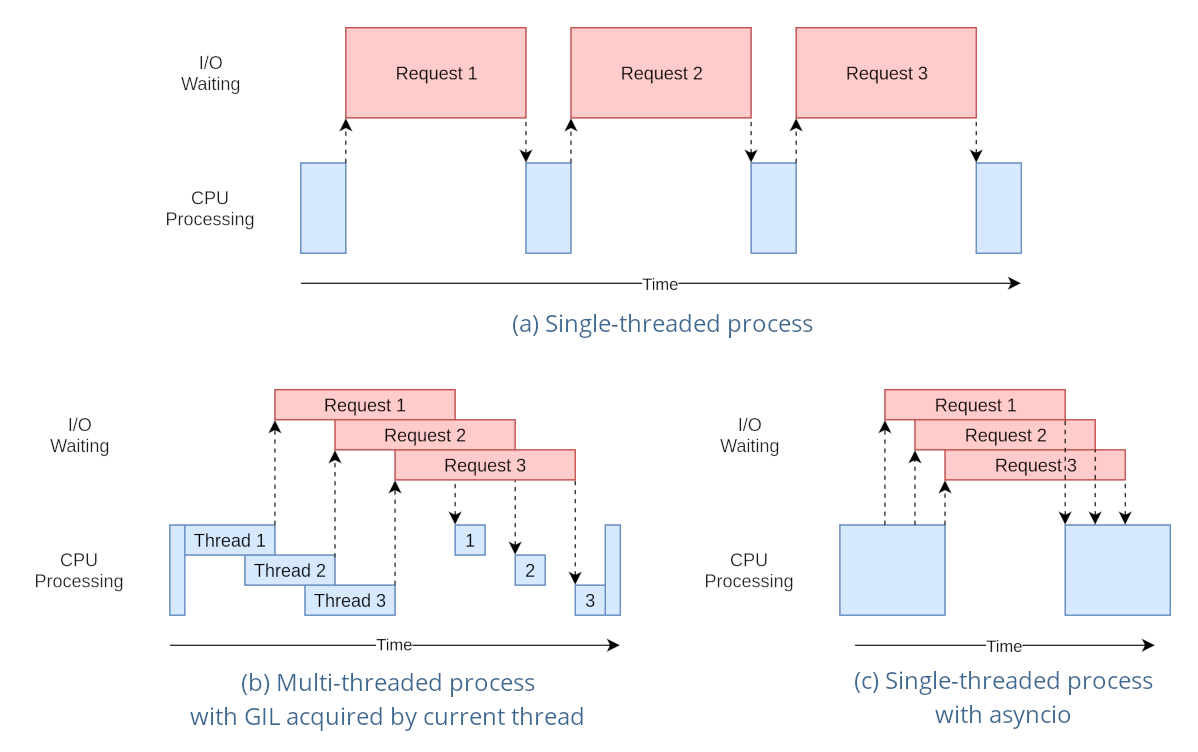
In my server implementation I used asyncio with FastAPI (docs at https://fastapi.tiangolo.com/async/):
@app.post("/scan")
async def scan_image(request: Request, file: UploadFile = File(...), color_channel: str = None):
    # Log request information
    log_info = {
        "timestamp": str(datetime.now()),
        "requested_channel": color_channel,
        "client_address": request.client.host,
    }
    logging.info(json.dumps(log_info))

    # Read image file
    contents = await file.read()

    # Process image asynchronously
    result = await process_image(contents, color_channel)

    return result
What async does is as soon as it receives a POST, it does not have to wait and block every other code from running until the POST is processed. This is like a que that allows the server to never crash because of concurrent users.
The logger used is also concurrently safe by default, so nothing had to change there
Part 2
Objective: Write python code that counts the number of unique objects that were detected by the camera
The first thing I did was manually figure out the set of rules for counting unique objects.
Frame 1:

size = 0

current:

---------
Frame 2:

size = 0 + 2

current: big size 1, big size 2

---------
Frame 3:

size = 0 + 2

current: big size 1, big size 2

currentframe: big size 1, big size 2

---------
Frame 4:

size = 0 + 2

current: big size 1, big size 2

currentframe: 0

= here should remove current objects
(removed big size 1, big size 2)

--------
Frame 5:

size = 0 + 2 + 2

current: 0

currentframe: big size 1, big size 2

= here should after the mapping, match the current
= add 2 new

-----
-------- (0:00:04)
Frame 6:

size = 0 + 2 + 2

current: big size 1, big size 2

currentframe:

=
My strategy here is simple.
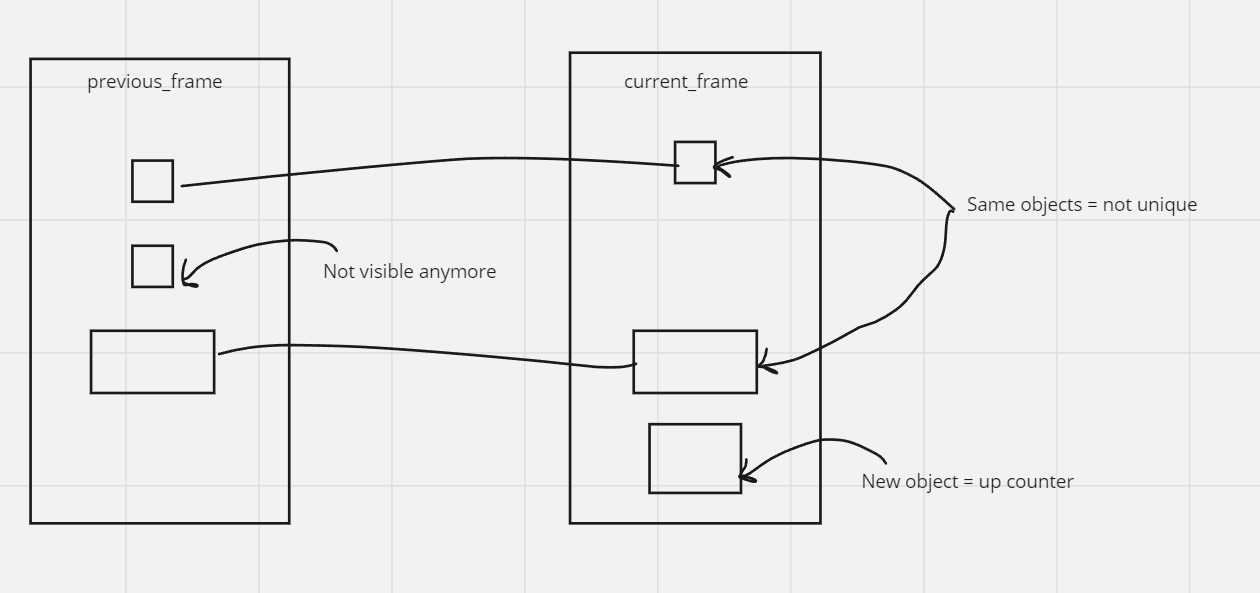
First we have a bucket called previousframe. We also have a bucket called currentframe. These buckets will hold the bboxes and their size.
Each frame, we “map” or “match” the current_frame bboxes to the previous_frame based on size. Logically, if there is a bbox left in the current_frame, that box is new and we add it as a unique object. And, if there is a bbox left in the previous_frame that is not “mapped”. Here is how I envisioned the mapping process
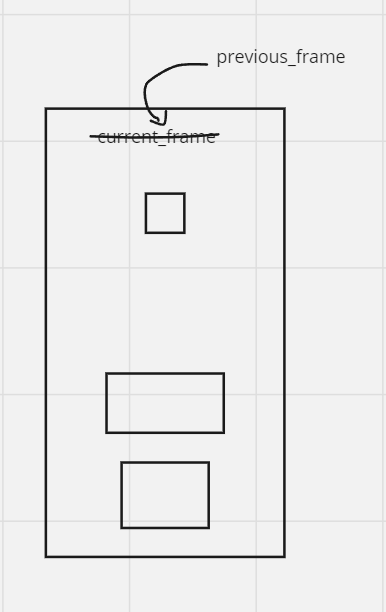
Now we update our current_frame to be the previous_frame. The next frame / step will look like this:
I was also asked to focus on software quality and testing, so I broke down my logic to smaller functions, then I turned them into classes, then I seperated the logic so you can import it and integrate it into any other project resulting in this:
class ObjectCounter:
    def __init__(self, camera_intrinsics, depth, rotation_matrix, frame_width, frame_height):
        self.camera_intrinsics = camera_intrinsics
        self.depth = depth
        self.rotation_matrix = rotation_matrix
        self.frame_width = frame_width
        self.frame_height = frame_height
        self.total_unique_objects = 0

    def transform_pixel_to_world_coordinates(self, pixel_coords, depth, camera_intrinsics, rotation_matrix):
        # Convert pixel coordinates to camera coordinates
        homogeneous_pixel_coords = np.concatenate([pixel_coords, np.ones((len(pixel_coords), 1))], axis=1)
        camera_coords = np.linalg.inv(camera_intrinsics) @ homogeneous_pixel_coords.T

        # Convert camera coordinates to world coordinates
        world_coords = rotation_matrix @ camera_coords * depth
        return world_coords[:3].T

    # Bla bla the rest etc
And you can import with
import ObjectCounter from object_counter
AI-Based Product Recommendation System:
This was for my 3rd year final project where we had freedom of choice for the topic. We used a popular algorithm used in social media to predict what a user might like given their history of clicks and likes to predict what a user might purchase next at something like a grocery store.
First we pre-process the data, creating a dataframe and using Customer Name and Category as labels. Then we create a pivot table of users as the rows and columns are products, then the values are how much of the product the user bought.
Then we do the following:
# Calculate cosine similarity between users
cosine_sim = cosine_similarity(user_product_matrix)
This technique comes from collaborative filtering, where it first treats each row as a vector and then calculates the cosine similarity between these vectors essentially seeing how similar users are based on purchasing history.
Then to get a recommendation, we have the following function:
def get_recommendations(user_id, cosine_sim_matrix, user_product_matrix, num_of_recommendations):

    # Check if the user ID exists in the dataset
    if user_id not in online_retail_with_names['Customer Name'].unique():
        print(f"User ID {user_id} not found in the dataset.")
        return []

    user_index = online_retail_with_names[online_retail_with_names['Customer Name'] == user_id].index[0]
    similar_users = list(enumerate(cosine_sim_matrix[user_index]))
    sorted_similar_users = sorted(similar_users, key=lambda x: x[1], reverse=True)[1:]

    recommended_products = []
    for user in sorted_similar_users:
        similar_user_index = user[0]
        products_bought_by_similar_user = user_product_matrix.iloc[similar_user_index]
        unrated_products = products_bought_by_similar_user[products_bought_by_similar_user == 0].index

        for product in unrated_products:
            if product not in recommended_products:
                recommended_products.append(product)

    return recommended_products[:num_of_recommendations]
Here is where everything clicks together. The function receives a target user with some purchasing history. Then it checks the closest other user in purchasing history to this given one. Then it checks what products this other similar user purchased that the target user has not purchased, and recommends them! Pretty cool not gonna lie.
Source Code: https://github.com/HikaruSadashi/3351FinalProj/blob/main/main.py Full submission document: www.khalidzabalawi.ca/finalproj.pdf